I saw a Reel of a portfolio building itself: a crowd of little cursors, each with a name tag, flew in, dragged out blue selection boxes, left grey wireframes behind and turned each one into the finished section while the page scrolled itself. It looks like a team of agents working live in Figma. I wanted one in my own style, so I built it. It is live at avivashishta.com/lab/agents-at-work.
Twelve cursors (Claude, Codex, Layout, Copy, Hub, Brands, Clients, Students and four more) build the whole page: the header, the headline, a framed sky with five Reels, a card for each of my four agents, three numbers and my most watched Reels. When the last block is done, they hand it over to me.
The short version: every block on the page is real HTML with a data-block attribute and goes through four states: empty, mark (a cursor drags a dashed marquee over it), rough (a blue outline, a grey skeleton and the line of JSX it stands for) and done (the content snaps in with a flash). One requestAnimationFrame loop moves all the cursors. On first load the whole page builds itself in about fifteen seconds, the camera following the work. Scroll on purpose and it hands over and builds whatever is on screen.
Step 1: four directions (Codex)
Before writing any code I had Codex draw four versions of the idea in my homepage's style, with a screenshot of the homepage attached so it kept the paper, the serif and the framed sky.
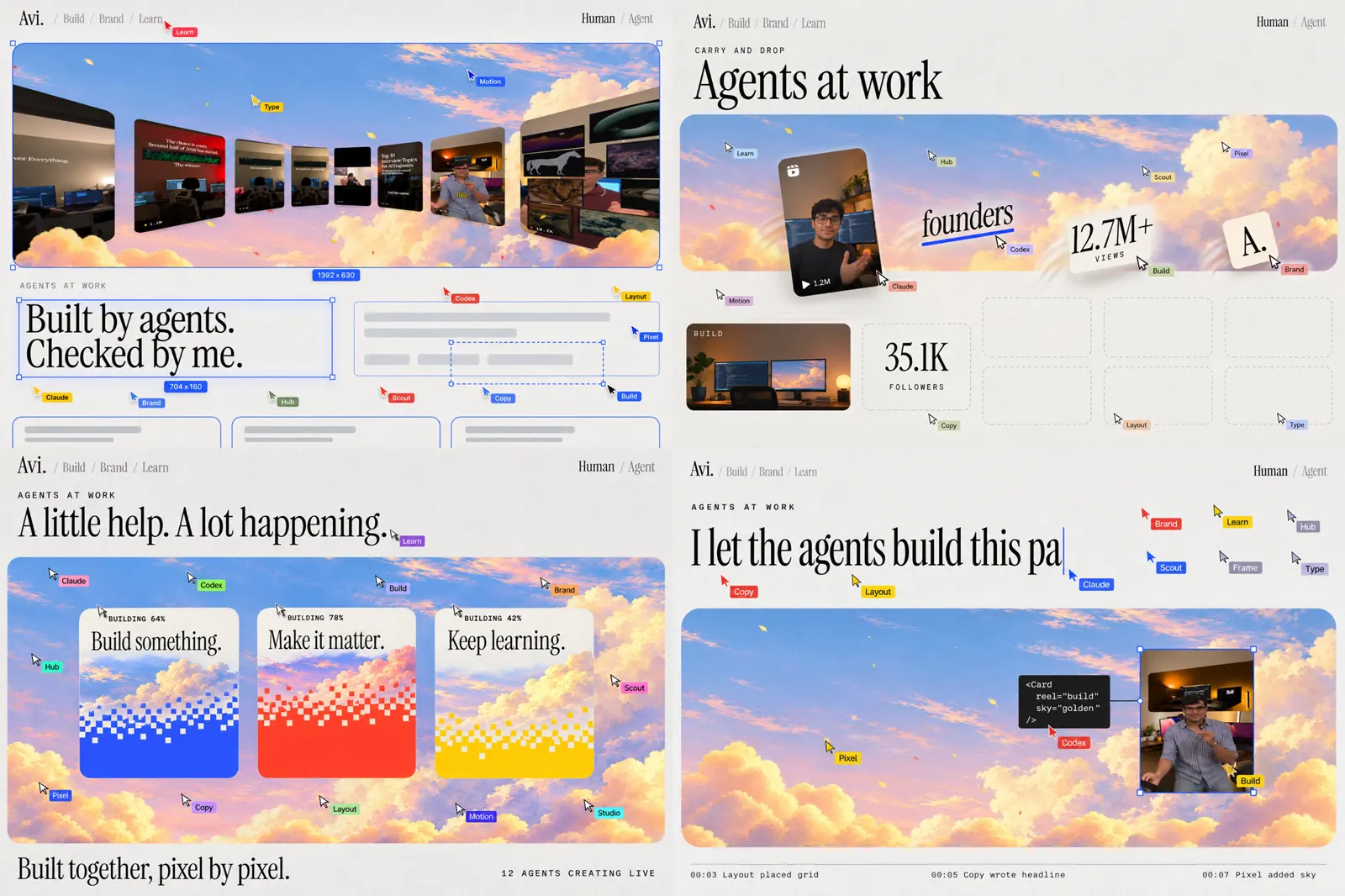
- Marquee to real. Blue boxes, skeletons, then the content. The closest to the original and the clearest payoff.
- Carry and drop. The cursors carry the real pieces into empty slots. Playful, but busy.
- Pixel fill. Each block fills with its world's colour in pixels and resolves. Bold, but too much over a whole page.
- Written live. Headlines typed with a caret, code tooltips, an agent log. The smartest, but quiet on its own.
I went with 1 as the base, added the typing, tooltips and log from 4, and kept 3 for one moment only: the four agent cards fill in their world's colour as they land.
With the Codex CLI, put each prompt in a file and pass it on stdin, one job at a time, with the screenshot as an image. Put -i before -C: -i takes several files, so a - right after it is read as a file name.
codex exec --skip-git-repo-check -i home.png -C ./out - < concept-1.prompt
Step 2: blocks and their four states
The page is ordinary JSX. Anything the agents build is a data-block with exactly one child, .fill, which holds all its visuals (backgrounds, shadows, text). The block keeps its size the whole time, so nothing on the page moves while it builds; only the fill appears.
<article data-block data-paint="var(--color-studio)" data-agent="Brands"
  data-log="built the Brands card" data-code={'<Agent name="Brands" />'} className={styles.card}>
  <div className={styles.fill}>...</div>
</article>
data-log is the line in the agent log, data-code is the tooltip, data-agent asks for a cursor by name (Claude writes the headlines, each agent builds its own card) and data-paint gets the pixel fill.
The hiding is pure CSS, and only when it will be undone. With no JavaScript or with reduced motion, the page is just there:
@media (scripting: enabled) and (prefers-reduced-motion: no-preference) {
  .page [data-block]:not([data-state="done"]) > .fill { opacity: 0; pointer-events: none; }
}
The rough state is a pseudo-element: an inset blue outline and three grey bars drawn with gradients, so there is no extra markup for skeletons.
Step 3: the cursors
Each cursor is a small SVG arrow and a name tag in one of the brand colours. All twelve are moved by one loop, in page coordinates, so they scroll with the page. A cursor is either on a job (a tween to a point) or idle, drifting in a loose flock around the section being built.
Travel time grows with distance, and the path bows a little off the straight line, never a big arc:
const b = Math.sin(Math.PI * e) * tw.bow;            // bow = distance * 0.06, left or right at random
a.x = tw.fx + dx * e - (dy / len) * b;
a.y = tw.fy + dy * e + (dx / len) * b;
One job is: fly to the block's top left corner, drag to the bottom right (the marquee and its "1392 x 630" label follow the cursor every frame), let go, wait a moment in the middle of the rough block, then finish it. A section gives its blocks to up to four cursors at once, round robin, so different names show up all over the page.
Step 4: typing without reflow
Typing into a headline usually makes the page jump, because the line gets longer as you type. So the full headline stays where it is, just transparent, and the typed text goes in an overlay on top of it, with a caret in the typing agent's colour. The cursor follows the caret every few letters.
.page [data-type][data-typing] { color: transparent; }
.typing { position: absolute; inset: 0; color: var(--color-ink); }
The overlay has the same font and width as the headline under it, so it wraps on exactly the same words.
Step 5: autoplay, then your scroll
On first load the page builds itself top to bottom. Two things keep it watchable as one continuous take:
- The camera follows the work. Every block being worked on goes in a set. Whenever a job starts or ends, the page scrolls just far enough to show the lowest of them, but never so far that the highest one leaves the screen. Tall sections (the hero is taller than a laptop screen) get built in view instead of below the fold.
- No dead air between sections. As soon as a section is done the page scrolls to the next one (through Lenis when it is running, so the smooth scroll stays in step), and the cursors set off while it is still scrolling. Their targets are in page coordinates, so the scroll doesn't throw them off.
A deliberate scroll is the hand-over: about two notches of the wheel inside half a second, a 60px drag on a phone, or a scroll key. A brush of the trackpad doesn't count, so the show doesn't stop by accident. Add ?play to the URL (/lab/agents-at-work?play) and it never hands over at all, which is what I used to record it. From then on an IntersectionObserver decides: only sections on screen get built. That took one fix. At first the queue built sections in page order, so if you scrolled straight to the bottom, the agents went back to build the sections you had skipped while the ones you were looking at stayed empty. Now a skipped section waits until it scrolls back into view.
"Watch it build again" pulls the page apart from the bottom up (each block drops back to its skeleton, then to nothing), scrolls to the top and plays the whole thing again, in play mode, since asking to watch it again means watching all of it. Skip finishes everything at once.
The small things
- The log in the corner is the clock: each line is a timestamp, the agent's tag and what it did. When the page is done it says how long it took.
- The numbers count up from
data/stats.jsonas they land, and the Reels are the real most watched ones, so the page is never out of date. - The pixel fill is a grid of spans in the world's colour, each with a delay from its row (bottom first) plus a little noise. The card's content fades in a third of a second behind it.
- On phones there are fewer cursors on each job and the log shows two lines.
Build your own
Build a page that a swarm of named agent cursors builds live, in React with CSS modules. Every block on the page is real, server-rendered HTML marked data-block, with one child .fill that holds all its visuals, and goes through four states: empty, mark (a cursor drags a dashed blue marquee from its top-left to its bottom-right corner, with a live "W x H" label), rough (a solid blue outline with square corner handles, a grey skeleton drawn with CSS gradients on a pseudo-element, and a dark tooltip with the line of JSX the block stands for) and done (the content appears with a short scale and blur, and a blue glow flashes on the border). Hide unbuilt blocks only under @media (scripting: enabled) and (prefers-reduced-motion: no-preference), so the page is complete without JS or with reduced motion.
Twelve cursors (an SVG arrow and a small name tag in one of three brand colours) are moved by a single requestAnimationFrame loop in page coordinates: on a job they tween with ease-in-out and a slight bow off the straight line; idle, they drift in a loose flock around the active section. Each section's blocks are shared round-robin between up to four cursors; a block can ask for a cursor by name. Headlines are typed into an absolutely positioned overlay over the transparent full text, so nothing reflows, with a caret in the agent's colour that the cursor follows. A fixed log in the corner prints a timestamp, the agent's tag and what it did for each block.
On first load, build top to bottom and smooth scroll to each next section. While it plays, keep every block being worked on in view: scroll just far enough for the lowest, never so far the highest leaves the screen, and start the next section while the page is still scrolling to it. On a deliberate scroll (two wheel notches within half a second, a 60px touch drag, or a scroll key), switch to building only the sections an IntersectionObserver says are on screen; ?play in the URL disables the hand-over. Add Skip (finish everything) and Rebuild (drop blocks back to skeleton and then empty from the bottom up, scroll to the top, play again). Cancel cleanly on every restart and on unmount.