Every developer has the green grid and nobody wears it. So I knitted mine into a Christmas sweater: one stitch per day for the last year, greener on the days I shipped more, my username across the chest and my total under the trees. Then I made it work for anyone. Make your own at avivashishta.com/lab/sweater: type a username and watch it knit, cuffs first, then the body from the hem up, then the collar.
The short version: the sweater is four pieces drawn on a canvas, like a real one is knitted: two sleeves at an angle, the body and a ribbed crew collar. Every stitch is a "V" of two yarn legs, drawn once per colour into a tiny sprite and stamped thousands of times with a little jitter. Soft light, creases, loose fibres on the edges and a shadow make it look like wool on a table. The chest is a 61 by 78 stitch chart, and the contribution graph fits on it exactly: 53 weeks by 7 days. Your data comes from GitHub's public calendar, cached for a day.
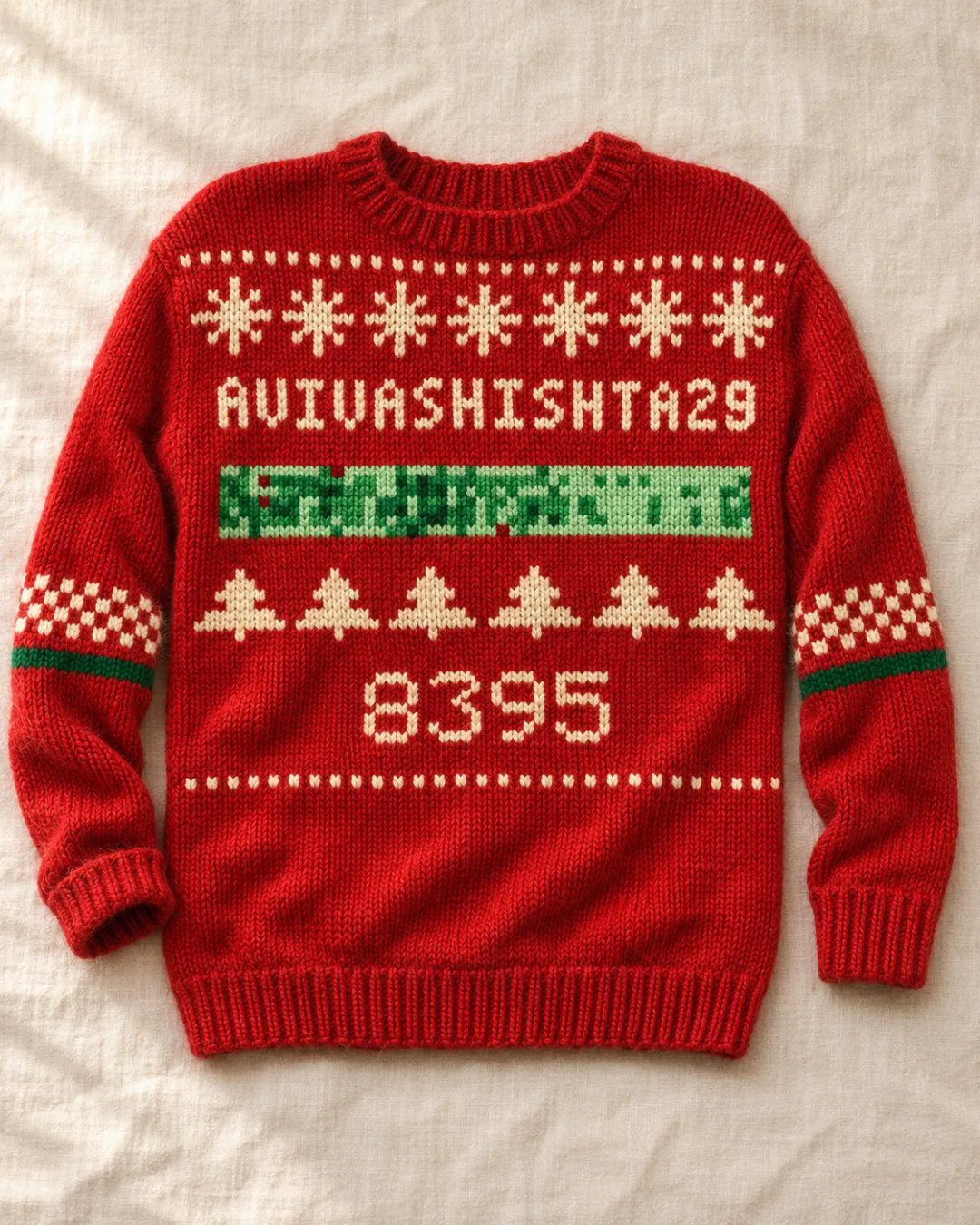
That one is a Codex photo of my sweater. More on it at the end.
Step 1: the chart
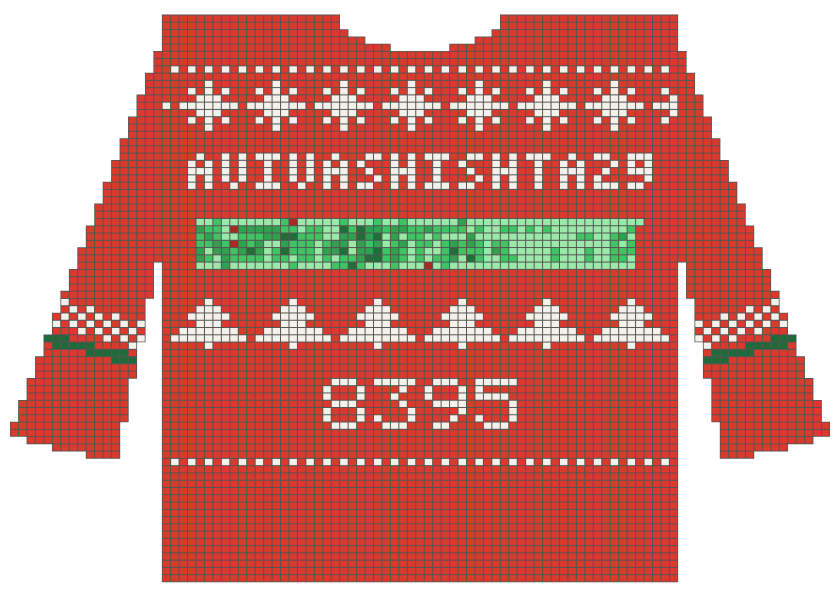
A knitting chart is a grid where every square is one stitch, which is exactly what a contribution graph already is. The front of the body is 61 stitches wide and 78 rows tall, and from the neck down it holds:
- a dotted row and a band of snowflakes,
- the username in a 5 by 7 stitch font (long names drop to a 3 by 5 font, very long ones go onto two lines),
- the contribution graph: 53 columns of weeks, 7 rows of days, GitHub's four greens, and a darker shade of the yarn for days with nothing,
- a band of trees and the year's total,
- a ribbed hem.
The motif bands repeat a small pattern and centre whole repeats, so no snowflake is ever cut in half at the side seams. The four yarns are the site's three colours (red, blue, yellow) plus ink, and each one picks its own colour for the motifs.
Step 2: a stitch
Stockinette, the smooth side of most sweaters, is rows of little V shapes. Each V is two tilted ellipses with a gradient (lit at the top, in shadow at the bottom), a few diagonal grooves for the plies of the yarn twisting round each other, and three loose fibres standing off the edge.
for (const side of [-1, 1]) {
  x.translate(cx + side * u * 0.215, cy);
  x.rotate(side * 0.5);                 // the two legs lean apart into a V
  x.ellipse(0, 0, u * 0.26, rowH * 0.64, 0, 0, Math.PI * 2);
  // + gradient fill, ply grooves clipped to the leg, a dark rim, loose fibres
}
Drawing that 6,000 times would be slow, so each combination of colour, rib or not, and one of four random variations is drawn once into a small canvas and reused. Every stamp also gets a tiny offset from a hash of its position, so the fabric has the uneven tension of real knitting but looks the same every time you load it.
The ribbing at the cuffs, hem and collar is a narrower, more upright V, and every other column is a shade darker, which is what knit-one-purl-one looks like from the front.
Step 3: the shape
My first version was a rectangle with stair-stepped sleeves, and it looked like a pixel sprite. A real sweater is pieces sewn together, so this one is too:
- The body has shoulders that slope down from the neck, sides that come in a little at the waist, and a hem rib that pulls in slightly narrower than the body above it.
- The sleeves are knitted in their own frame, turned 40 degrees, from the cuff up. Their top edge is cut to match the armhole seam, which runs straight down the side of the body, so they hang off the shoulders like a real flat lay. The cuffs are ribbed and gathered in.
- The collar is three rounds of rib on an ellipse, and every stitch is turned to face out from the neck, the way a crew neck is picked up and knitted. Through it you see the inside of the back, in the shadow of the back of the collar.
Each piece is clipped to a smooth outline, so the edges are curves, not steps. Then each one is finished separately: a low-frequency noise and a light from the top left blended in with soft-light for the drape, a few long soft multiply streaks for creases at the elbows and under the arms, short fibres poking out along the outline for fuzz, and a two-layer shadow drawn underneath with destination-over.
Step 4: knitting it live
Each piece is rendered once into its own canvas. The animation only changes how much of each one shows: the sleeves are revealed from the cuff up along their own axis, the body from the hem up, and the collar sweeps round from the front. A thin line rides along the row being knitted.
const p = [ease(t / 0.42), ease(t / 0.42), ease((t - 0.3) / 0.58), ease((t - 0.84) / 0.16)];
pieces.forEach((piece, i) => {
  ctx.save(); ctx.clip(piece.reveal(p[i])); ctx.drawImage(piece.canvas, 0, 0); ctx.restore();
});
Changing the yarn swaps the finished pieces in place; a new username knits from scratch. Hover any green stitch and it tells you the day and how many contributions it was.
Step 5: anyone's GitHub
/api/lab/github/{user} returns a year of contributions. With a GITHUB_TOKEN it asks GitHub's GraphQL API (the same query that keeps my graph on /lab/commits fresh). Without one it reads the public calendar at github.com/users/{user}/contributions, which needs no token: every day is a <td data-date data-level> and its count sits in a matching <tool-tip>. Either way the answer is cached for a day, so if a thousand people knit the same friend, GitHub is asked once.
A shared link like /lab/sweater?u=torvalds knits that person's sweater as soon as it opens, and Save image gives you the PNG.
Step 6: knitted for real (Codex)
To see what it would look like as a real jumper, I gave Codex the flat chart from Step 1 and asked for a product photo of it knitted in wool, then a macro of the green band.
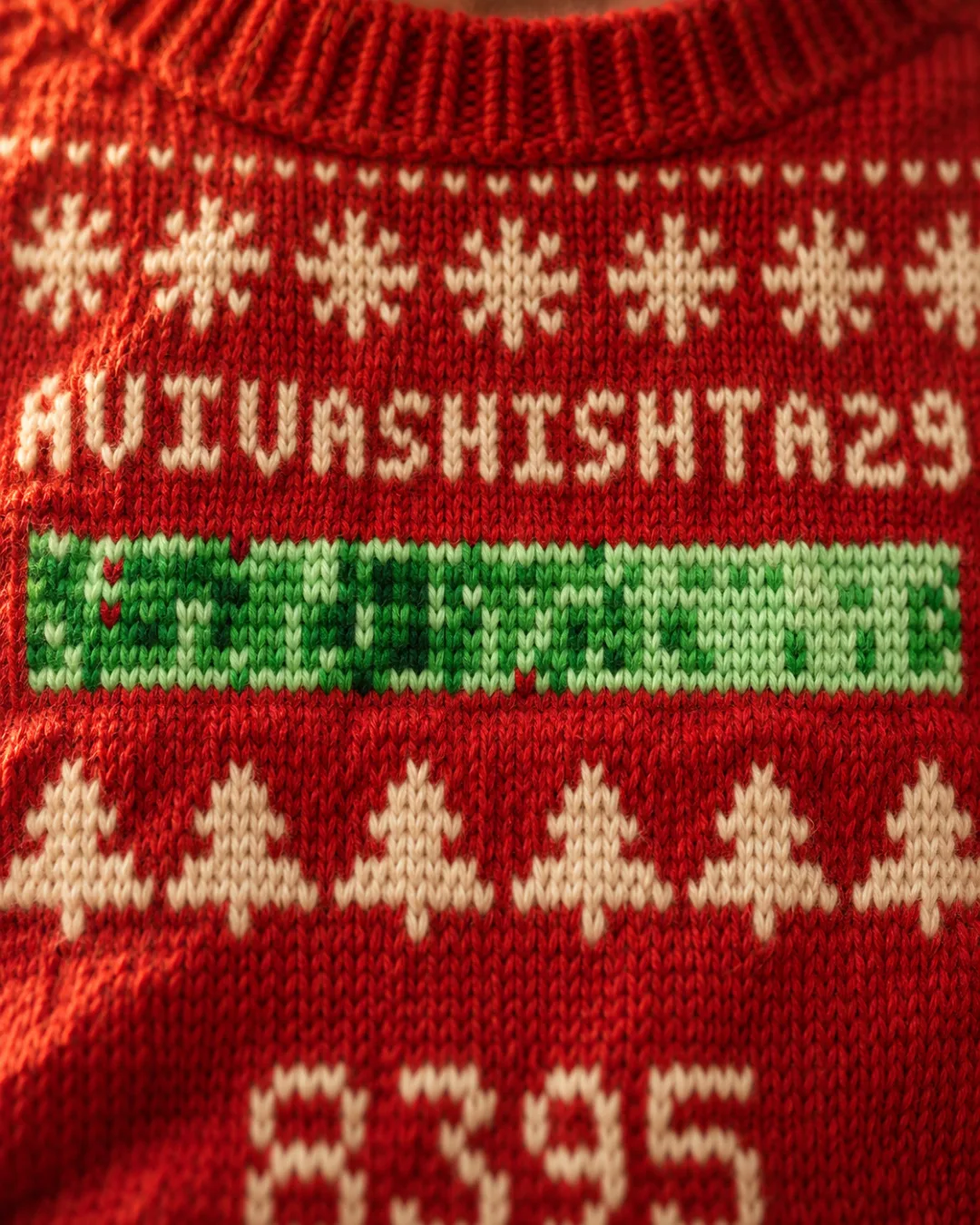
A photorealistic product photograph of a real hand-knitted wool Christmas jumper lying flat on a warm off-white linen surface, shot from directly above with soft window daylight from the left. Portrait 4:5 framing, the whole jumper in frame with some margin, sleeves angled slightly down and outward with natural soft creases, one cuff gently folded.
The attached image is the knitting chart. Every small square is one stitch. Knit the front of the jumper to follow that chart exactly: the same red body, the same cream colourwork, and the same layout from top to bottom: a dotted cream row under the ribbed crew neck, a band of cream snowflakes, the username in cream blocky stitched letters across the chest, then a wide band of small green squares in four shades of green (pale mint to deep forest), exactly like a GitHub contribution graph, then a band of cream Christmas trees, the total in cream stitched digits, a dotted cream row, and a ribbed hem. The sleeves have a cream and red checker band and a deep green stripe above ribbed cuffs.
It must look like a real physical garment: visible V-shaped stockinette stitches, slightly fuzzy chunky wool with stray fibres and a soft halo, tiny irregularities in tension, colourwork floats making the motifs slightly puckered, real fabric thickness and soft shadows. Not a render, not a vector, no text overlays, no logos, no watermark. Colours true to the chart.
codex exec --skip-git-repo-check -C ./out -i chart.png -- - < flatlay.txt
Put -- before the - that reads the prompt from stdin, or Codex takes it for another image, and run one job at a time. Attaching the chart is what makes it work: Codex follows the layout closely (same bands, same name, same total), and the green band comes out close to my real year, if not stitch for stitch.
Make your own
Go to /lab/sweater, type your username, pick a yarn and save the image. Or build your own version:
Build a page that knits a GitHub contribution graph into a holiday sweater on a 2D canvas. Fetch the user's last year of contributions (GitHub GraphQL contributionCalendar, or parse github.com/users/{user}/contributions). Build a 61 x 78 stitch chart for the front: a snowflake band, the username in a 5x7 pixel font, the 53 x 7 contribution grid in four greens with a darker shade of the yarn for empty days, a tree band, the total, and a ribbed hem.
Draw each stitch as a V of two tilted gradient ellipses with diagonal ply grooves and a few loose fibres, cached per colour as small sprites and stamped with a hash-based jitter. Make the garment from pieces: a body with sloped shoulders, a slight waist and a gathered hem rib; two sleeves knitted in their own rotated frame (40 degrees) from ribbed cuffs, with their top edge cut to the vertical armhole seam; and a crew collar of three rounds of rib on an ellipse with each stitch rotated to face outward and the dark inside of the back showing through. Clip each piece to a smooth outline, add soft-light noise and a light gradient, multiply creases, edge fuzz and a shadow underneath. Animate by revealing the sleeves from the cuff, then the body from the hem, then the collar, with a thin line on the row being knitted. Hovering a green stitch shows its date and count.