You've seen this Reel. Three cars parked across an empty highway at night, a camera that never moves, and the lights doing all the work: the headlights snap on and flood the road on the downbeat, then the turn signals blink right, left, right in the dark between. I made it with three Porsche 911s, without owning a Porsche, a highway or a camera. Claude Code ran the whole thing through Higgsfield.
The short version: it isn't a video model job. The camera never moves, so the whole Reel is one photo with the lights switched on and off. Generate one lights-off frame, edit it twice (headlights on, all indicators on), subtract to get just the light, and add that light back on the exact frames the reference does. Five 4K stills, about 30 credits, frame-accurate to the original.
The prompt
Give Claude Code the Higgsfield MCP, paste the link to the Reel you're copying, and send this. Swap the cars for whatever you want.
Recreate this Reel with three Porsche 911s (992 generation), using its audio: <paste Instagram link>. Use Higgsfield for every image. It must look like real footage, 4K, horizontal 16:9.
FIRST, STUDY THE REFERENCE. Download it, extract the audio, and confirm whether the camera ever moves. Then measure the light timeline frame by frame at its real frame rate, not by eye: for each frame, the brightness of the road in front of the cars (headlights on or off) and the amber pixels in the left and right half of each car's lamps (which side is blinking). Turn that into a list of events: type (headlights, right signals, left signals, all signals), first frame, last frame. Also measure how much each state brightens the road. Show me the timeline before you build.
THE MASTER FRAME. Take a lights-off frame from the reference and upload it. With GPT Image 2.6 (4K, high quality), edit that frame: keep the camera, lens, framing, road, streetlights and colour grade identical and replace only the cars with three 911s in the same positions (black, white, black), all lights off. Give me 3 variants and stack them under the reference frame so I can pick the closest match.
THE LIGHT STATES. Edit the chosen master twice and change nothing but the lights: (1) headlights and daytime running lights on, matching the reference's lit frame (pass it as a second reference) so the light pool on the road has the same size and brightness; (2) every amber indicator on, including the mirror repeaters. Check alignment: the sky above the cars should match the master at 35 dB PSNR or better.
THE COMPOSITE (numpy and ffmpeg). Light layer = edited still minus master, masked to where the brightness actually changed. Make left-only and right-only signals by splitting the indicator layer at each car's centre, found from the lamp positions. Render 30fps by adding the layers onto the master on exactly the measured frames: headlights snap on with one half-bright frame and cut off hard, indicators ramp in over a frame and fade over one. If the indicators brighten the road less than the reference, add a soft warm glow below the lamps and scale it until the road lift matches. A little film grain, no camera move, no rain, no extra flashes, nothing the reference doesn't do.
CHECK IT. Make a side-by-side of the reference and ours at 10fps, and count the frames where the states disagree. Anything more than a one-frame edge is a bug. Then export the 4K 16:9 master with the original audio.
Concept 1: it's a photo, not a video
The first thing to check in any Reel you're copying is whether the camera moves. In this one it doesn't move a pixel for thirteen seconds. That changes the whole plan: you don't need a video model at all, you need one perfect still and a way to switch its lights.
I learned that the expensive way. I asked Seedance for a 14 second locked-off clip with the master as both the first and last frame. It came back re-framed (the cars lower and bigger) and almost completely still, 48 dB between frames. Useless as a plate, and the lights would never have lined up with it.
Concept 2: light is a subtraction
Ask an image model for "the same photo with the headlights on" and you get a new photo: the grain changes, the haze shifts, a reflection moves. Cut between the two and the whole frame flickers. So you never cut between stills. You subtract the lights-off master from the lit version, keep only the pixels that got meaningfully brighter, and add that layer back on top of the master. The master never changes, so nothing flickers but the lights.
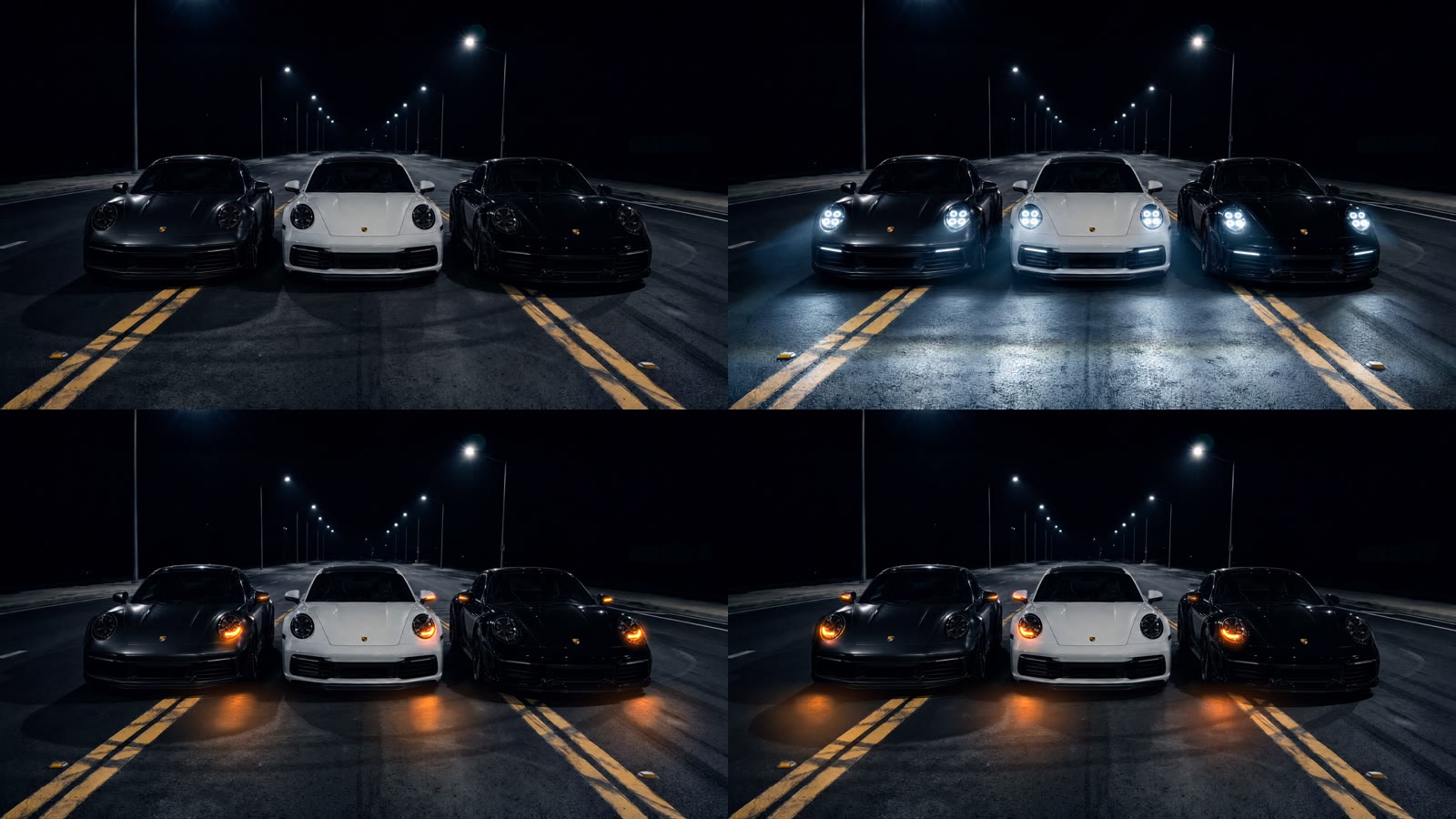
Two edits are enough. The left-only and right-only blinks are both cut out of the one "all indicators on" image by splitting it down the middle of each car.
Concept 3: steal the camera, not just the idea
My first master was a fresh text-to-image shot of three 911s on a highway. It looked great on its own and wrong next to the reference: the camera was further back, the cars filled half the width instead of most of it, there was too much sky. The fix was to edit a frame of the reference itself and swap the cars. Same lens, same height, same road lines, same grade, for free.
Concept 4: measure the timeline, don't guess it
I first timed the lights to the beat of the song: headlights on the downbeat, a signal on every other beat, high-beam flashes on the drop. It felt right and looked wrong. A frame-by-frame comparison showed why: the original never changes gear at the drop. It runs the same calm loop the whole time (headlights for about 0.3 seconds, then dark, then right, left, right with dark gaps between), with a triple headlight flash and a quick hazard flicker before the drop and no high beams at all.
So Claude measured every frame of the reference and wrote the timeline as data: 30 events, each with a first and last frame. The render reads that file. The final version disagrees with the original on single edge frames only, where a half-bright frame lands either side of the threshold.
Concept 5: match the intensity with numbers
"Brighter" isn't a direction anyone can follow. In the reference the headlights take the road from 38.6 to 130.4 (3.4x) and each amber blink lifts it 12%. The first headlights edit came out at 3.5x, close enough. The amber blinks lifted the road less than 1%, which is why they looked weak, so the render adds a soft warm glow under each blinking lamp and scales it until the road lifts 12%, the same as the reference.
What didn't work
- Rain. A soaked road with mirror reflections looked lovely in a still. With falling rain on top it looked busy and fake, and it fought the one thing the Reel is about.
- An AI high-beam flash. The "high beams on" edit hazed half the frame grey. A flash built from the headlight layer was better, but the real answer was that the reference never flashes at all.
- A generated video plate. See concept 1.
What it cost
The finished pipeline is five 4K stills: three master variants and two light states, about 30 Higgsfield credits. Everything I tried on the way there, including the dead ends above, came to about 113. The 4K master is 13 seconds at 30fps with the original audio.