Websites with a 3D character that watches your cursor usually mean a modelled, rigged robot in Three.js. I wanted the same effect without touching Blender: generate the robot as an image, make one video of it looking around, and let the browser pick the right frame for wherever your cursor is. It is live at avivashishta.com/lab/robot-hero. Move your mouse and it looks at it.
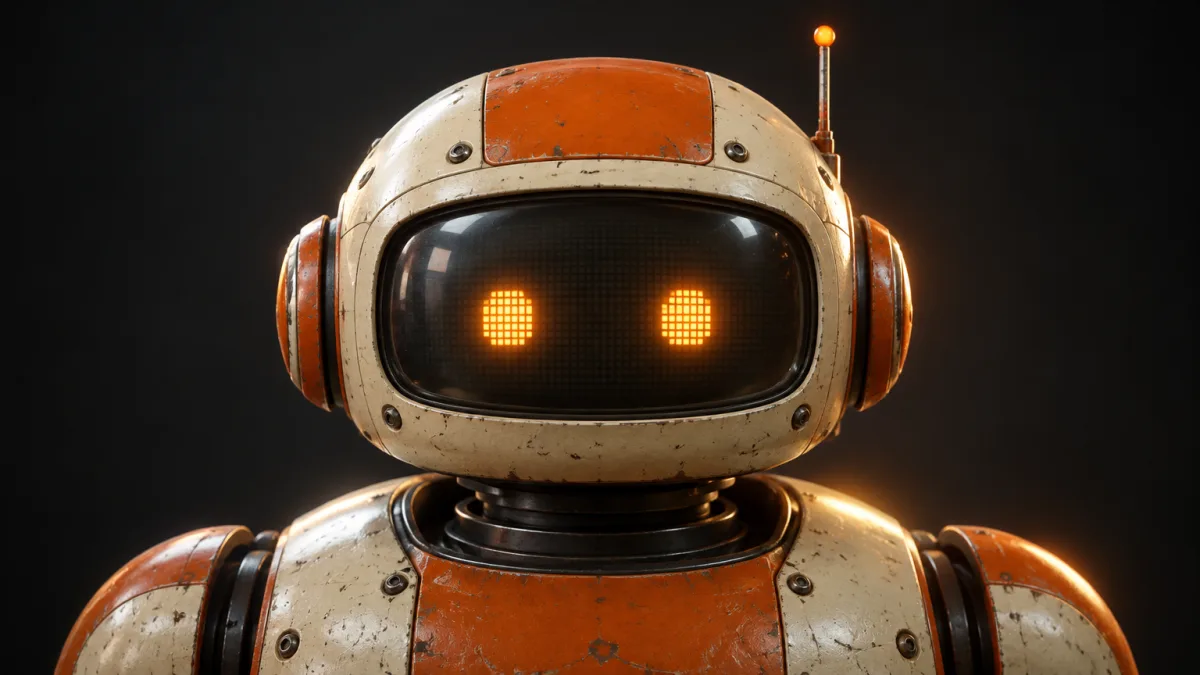
The short version: one robot image (Nano Banana Pro in Media.io), zoomed out so the head has room to move, turned into a 10 second look-around clip (Kling 4.0, image to video). The clip is cut into 241 frames, the background is removed from each, and a script finds the robot's glowing eyes in every frame. Where the eyes are is where the head points. On the page, the cursor picks the frame whose head points closest to it, and the clip plays forwards or backwards to get there.
Step 1: the robot
Everything here is made in Media.io: Image AI → Text to Image → Nano Banana Pro, 2K, 16:9. The prompt asks for something easy to animate: dead centre, perfectly symmetrical, facing the camera, and a plain dark background.
Cinematic website hero image, 16:9. A chunky retro robot, head and shoulders, perfectly centered and perfectly symmetrical, facing straight at the camera head-on, front view, eye level. Cream and burnt-orange painted metal with scuffs and wear, rounded 1970s industrial design, a wide curved CRT-style glass visor with two glowing amber pixel eyes, round orange ear pieces on both sides, a small antenna with a glowing orange tip, visible screws and panel seams, a ribbed metal neck. Soft studio key light, warm orange rim light, plain dark charcoal background with lots of empty space on both sides. Premium product-render feel. Single subject, no text, no logos.
The glowing eyes turned out to be the most useful thing in the prompt. They are the brightest, most orange pixels in the frame, so later a script can find them in every frame without any AI.
Step 2: zoom out
The first image is too tight: when the head turns, it would leave the frame. So it goes back in with Image AI → Image to Image, same model, to give the head room on every side.
Keep this exact same robot, identical design, colors, wear, lighting and front-facing pose. Zoom out: make the robot about 45% of the frame height, centered horizontally and sitting slightly low, showing the head, neck and the top of the shoulders. Surround it with lots of plain, even, dark charcoal background on all sides, especially above the antenna and to the left and right, so the head has room to turn and tilt. Same soft studio key light and warm orange rim light. No text, no logos, no other objects.
Two things that cost me time in Media.io:
- Image to Image only takes inputs under 1280 x 1280. Save a 1200 px wide copy of the 2K image and use that.
- Flipping a model's "Unlimited" toggle can clear the prompt box. Turn the toggle on first, then paste the prompt.
Step 3: the clip
This is the main feature: Video AI → Image to Video, with the zoomed out robot as the start frame. I tried two models.
| Model | Settings | Credits | Result |
|---|---|---|---|
| MiniMax H3 | 5s, 768P | 35 | A real 3D turn, but it went centre, left, centre, right |
| Kling 4.0 | 10s, 720P | 130 | Great quality, the head moves through every direction |
Kling won. The prompt locks the camera and walks the head around the clock, ending where it started, looking at you:
Locked-off static camera, no camera movement, no zoom, no cuts. The robot stays in place and only its head moves on the neck, slowly and smoothly, like it is curiously looking around the room. It starts looking straight at the camera, then looks up, then up and to the right, then fully right, then down and to the right, then straight down, then down and to the left, then fully left, then up and to the left, and finally back to looking straight at the camera. Each move flows into the next at a steady, even pace with no pauses. The eyes stay open and glowing amber the whole time, no blinking. The body, shoulders and dark background stay completely still. Same lighting throughout.
"No blinking" matters: the eyes are how the code tells where the head is. I ran the result through Media.io's Video Enhancer before downloading for a sharper export.
Step 4: frames, cutout and eye tracking
Claude Code did this part with four small Python scripts.
- Frames.
ffmpeg -i clip.mp4 -vf fps=24 raw/%03d.pnggives 241 frames. - Eyes. For each frame, keep the pixels that are bright, orange and not blue (
r > 235,g > 140,b < 160), group them into blobs, and find the pair side by side at the same height. The point between them is the head's direction for that frame. Missing frames are filled in from their neighbours and the whole track gets a median filter, so it doesn't jitter. - Cutout.
rembg(theisnet-general-usemodel) cuts the robot out of every frame. The head moves, so it gets a new mask every frame. The body doesn't, so its mask comes from frame 1 and is reused, which stops the shoulders from flickering. The two are merged with a soft ramp at the neck. - Export. Every frame is cropped to the box the robot ever covers and saved as a transparent WebP (about 37 KB each), plus a
manifest.jsonwith the frame size and the eye position of every frame.
{ "count": 241, "ext": "webp", "w": 741, "h": 468, "rest": 240,
  "pose": [[0.496, 0.4612], [0.496, 0.4612], ...] }
rest is the last frame, where the robot is looking straight at you again. That is what the page shows first.
Being transparent is what lets the headline sit behind the robot: the page stacks a warm glow, then "HELLO, HUMAN.", then the robot on a canvas on top.
Step 5: cursor to frame
The naive version, "cursor X picks a frame", doesn't work for a look-around clip, because the head moves in a loop. Up-right is around frame 60, but down-left is around frame 160. The page has to map a direction to a moment in time.
- Scale the cursor to the robot's range. The cursor is -1 to 1 on each axis. The clip's eye positions have a range (how far left, right, up and down it ever looked), so the edge of the screen maps to the furthest the robot actually turns.
- A 40 x 40 grid of good frames. For every cell, the page lists every frame whose eye position is within a small tolerance of the best one. The clip passes some directions more than once (it starts and ends at the centre), so a cell can have several.
- Shortest route. Of the good frames, it picks the one closest to where the playhead is now. The clip then plays forwards or backwards to it, never jumping.
const diff = goal - pos;
// fast when far, gentle as it arrives, at most 90 fps
const step = Math.sign(diff) * Math.min(Math.abs(diff), Math.max(Math.abs(diff) * 6 * dt, 4 * dt), 90 * dt);
pos += step;
pos is fractional, so each draw blends the two neighbouring frames, which makes 24 frames a second look smooth at any speed. After three seconds without a mouse move, the robot looks around on its own. The robot shows as soon as the two resting frames load, and the other 239 stream in behind.
Step 6: the boot screen
241 frames is about 9 MB, so the page opens on a boot screen: black, faint CRT scan lines, and just two amber pixel eyes (CSS squares with an 8 x 8 grid drawn by two gradients) that flicker on and blink, over a real counter, "WAKING UP 128/241". It waits for every frame, or three and a half seconds after the resting frame, whichever comes first.
Then the eyes find their robot. The page draws the resting frame, looks for the amber pixels in a small window around the eye position from the manifest, and turns those two boxes into screen coordinates. The boot eyes glide there and land exactly on the robot's eyes as it switches on behind them, dark with a couple of flickers, like an old CRT. Then the headline rises in letter by letter, and the robot starts following you.
What I'd do next: three sweeps
The loop works, but it has one weakness: to go from up-right to down-left, the head sometimes has to travel through the frames in between, so it takes a detour. The cleaner version is three straight sweeps, left to right at the top, middle and bottom, with the start and end frames generated first so the clips line up. Then cursor X is a direct lookup into a sweep and cursor Y blends between them: no detours at all.
The six pose images use Image to Image with the zoomed out robot, one prompt with the direction swapped in:
Keep this exact same robot, identical design, colors, wear, lighting, framing, size and position in the frame. Only the head rotates on the neck: the head is turned so the visor faces [DIRECTION]. The body, shoulders and background are exactly the same as the input. Eyes open and glowing amber. No text, no logos.
[DIRECTION] is "up and toward the left side of the image", "up and toward the right side of the image", "toward the left side of the image, at eye level", and so on for six. Then three 5 second clips in Image to Video with Add End Frame on (up-left to up-right, left to right, down-left to down-right):
Locked-off static camera, no camera movement, no zoom, no cuts. Only the robot's head moves: it turns smoothly in one continuous motion from the start pose to the end pose at a steady, constant speed, with no pauses and no going back. The body, shoulders and dark background stay completely still. Eyes stay open and glowing amber, no blinking. Same lighting throughout.
A fourth short clip of the robot blinking (its pixel eyes flicker off and on like an old screen) would play on click.
Build your own
I have a 10 second video of a character on a plain dark background, camera locked, looking around in a loop (up, right, down, left, back to centre), with two glowing eyes. Turn it into a hero section where the character's head follows the cursor. 1) Split the clip into frames at 24 fps with ffmpeg. 2) In Python, find the two eyes in each frame by colour threshold and blob pairing (two blobs at the same height, side by side), take the midpoint as the head direction, fill gaps by interpolation and median filter the track. 3) Cut out the character with rembg per frame for the head, plus one fixed mask from frame 1 for the body, merged with a soft ramp at the neck. Crop all frames to the union bounding box and export transparent WebPs plus a manifest.json with the size and every frame's eye position. 4) Build the page: a canvas on top of a big headline so the text sits behind the character. Map the cursor (-1..1) onto the clip's range of eye positions, build a 40x40 grid where each cell lists the frames within a small tolerance of the best match, and each frame pick the one closest to the current playhead. Move the playhead toward it with easing (capped at about 90 frames per second), blending the two neighbouring frames for fractional positions. Show the resting frame first and stream in the rest; when the cursor is idle for 3 seconds, look around on its own; respect prefers-reduced-motion.